
Run blind stocktakes on any phone, and undo bad stock edits.
Your staff count stock on any phone or on Shopify POS: blind, offline and several at once, with the scanner in English, Spanish, French, German, Italian, Portuguese or Dutch. You approve every difference before Shopify changes, and a whole count can be undone later. Stockproof also finds every stock change with no sale, transfer or count behind it, valued at cost and with who made it, and Stock Guard flags or reverses a bad edit or import. Adjust stock with a reason and a photo, print barcode labels, and give your accountant a count report, a stock certificate and a tamper-evident audit log.
Free plan available. Paid plans have a 14-day free trial. Billing is handled by Shopify.
- Jump Rope ProCounted blind by Sam
- 24
- Shopify expected
- 30
- Difference6 units at $5.64 cost
- −6
What it does
A stocktake app and a stock audit in one, for Shopify stores that need their stock numbers to be right.
- Stocktakes on any phone or Shopify POS: blind, offline, with several staff at once
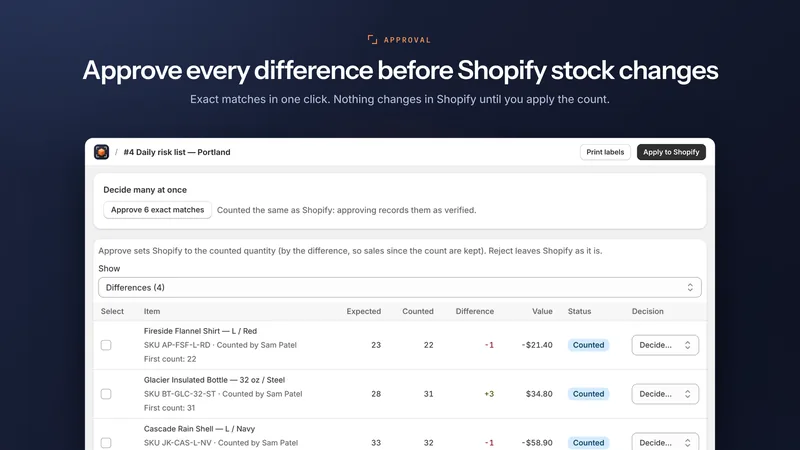
- Every difference approved before Shopify changes, and a whole count can be undone
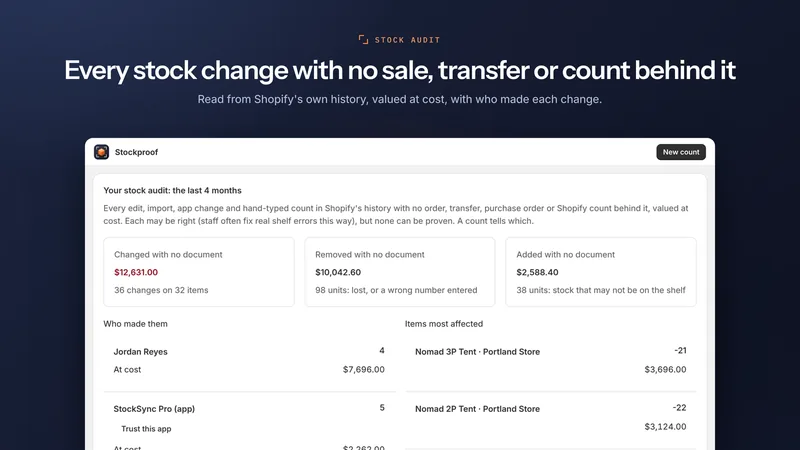
- Every stock change with no sale, transfer or count behind it, valued at cost, with who made it
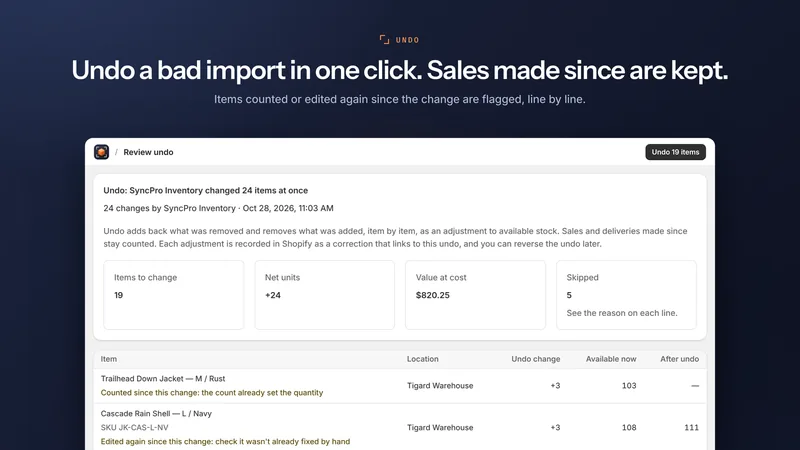
- Stock Guard flags a bad edit or import, or reverses it, keeping the sales made since
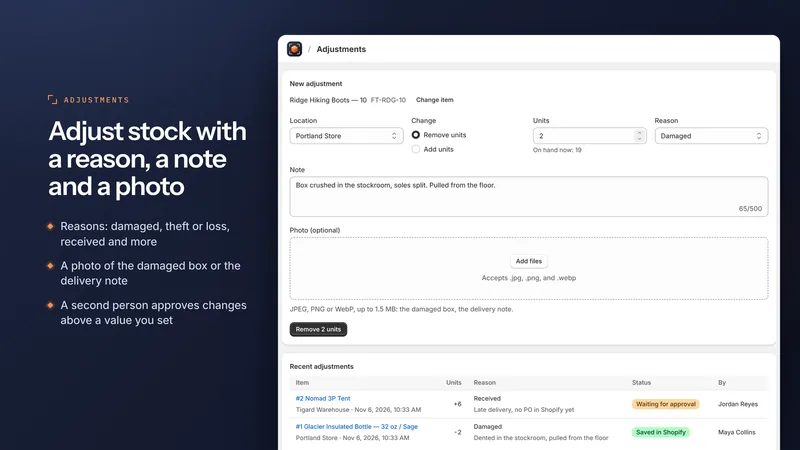
- Adjust stock with a reason, a note and a photo, with optional second-person approval
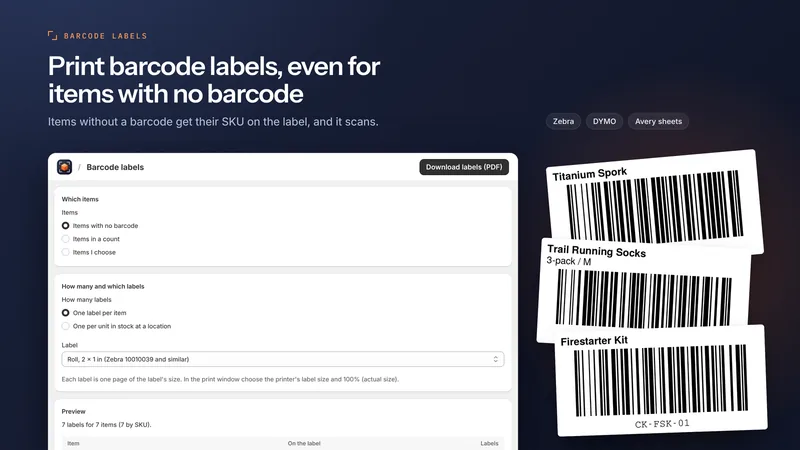
- Barcode labels for Zebra, DYMO or Avery, even for items with no barcode
- Count report (PDF and CSV), monthly stock certificate and a tamper-evident audit log
- Counted quantities typed or imported from a handheld scanner's file, and case barcodes
How a stocktake works in Stockproof
From an empty count to corrected stock in Shopify, with nothing changed until you approve it.
- Create a count
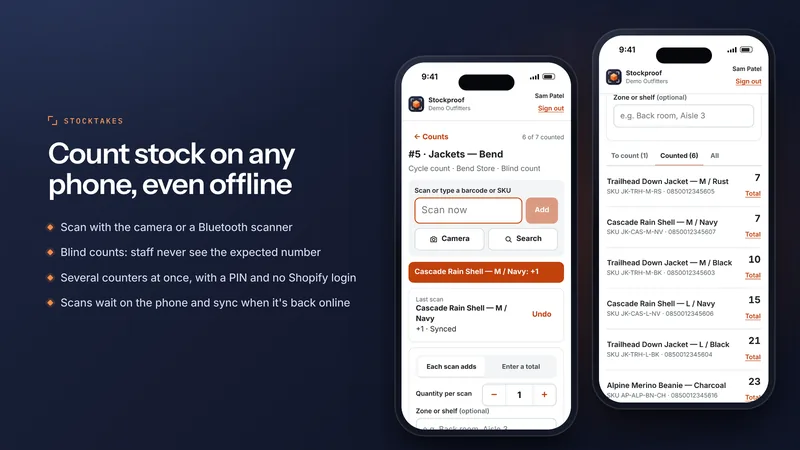
A full count of a location, a cycle count of chosen items, or a spot count of a few. Make it blind, so counters don't see the quantity Shopify expects. - Staff count on their phones
They open the store's counting link and sign in with a 6 to 8 digit PIN: no Shopify account. They scan with the camera or a Bluetooth scanner, or search by name. Scans made offline are kept and sent later. - Review the differences
Every difference is listed with its value at cost and who counted it. Approve exact matches in one click, recount what looks wrong, and choose a reason for each difference. - Apply it to Shopify
Corrections go to Shopify with the reason Cycle count. Download the count report as a PDF or CSV. If the count was wrong, Undo this count puts the stock back, keeping sales made since.
What you see in the app
The screens shown on the Shopify App Store listing, from the app running on a demo store.
Pricing
The same plans as on the Shopify App Store. The phone scanner, offline counts, the POS tile, barcode labels, count reports and Undo this count are on every plan.
Free
$0
- Reliability score for all your stock
- 3 quick checks a day per location
- Unexplained changes flagged, 1 location
- 2 counters, 100 counted items a month
- Phone scanner, offline counts, POS tile
Starter
$49/ month
or $529/year and save 10%
- Stock Guard alarm and one-click Undo
- Up to 50 quick checks a day per location
- Adjustments with reasons and photos
- Ask staff to explain any change
- 2 locations, 5 counters, 12 months
Growth
$99/ month
or $1,069/year and save 10%
- Stock Guard reverses bad edits
- Monthly stock certificate (PDF)
- Loss patterns by staff, app and vendor
- Shopify Flow, order and POS signals
- Audit pack and QuickBooks journal
- 10 locations, 25 counters, 24 months
- Everything in Starter
Pro
$199/ month
or $2,149/year and save 10%
- Multi-store HQ
- Unlimited locations and counters
- 36 months of inventory history
- Everything in Growth
- Priority support
Paid plans have a 14-day free trial. All charges are billed in USD. Billing is handled by Shopify.
Works with
- Shopify POS and Shopify Flow
- Bluetooth and USB barcode scanners, or the phone's camera
- Zebra and DYMO label printers, and Avery label sheets
- QuickBooks Online, through a journal import file
- Slack, for alerts
- Admin language: English. Phone scanner and POS tile: English, Spanish, French, German, Italian, Portuguese (Brazil) and Dutch
- App Store categories: Inventory optimization and Retail
Your data
- Stores products, stock levels, locations, Shopify's history of stock changes and the names of your own staff who change or count stock.
- Never stores your customers' names, email addresses, phone numbers or postal addresses.
- Nothing is sold, shared for advertising, or used to profile anyone.
- Uninstalling deletes everything the app holds for your store, after Shopify's erase request 48 hours later.
Questions
Can staff count stock without a Shopify account?
Yes. Each store has a private counting link. A counter opens it on any phone and signs in with their name and a 6 to 8 digit PIN that you set in Stockproof. They never see the Shopify admin.
What is a blind count?
In a blind count the counter doesn't see the quantity Shopify expects, so they count what is on the shelf instead of confirming a number. You choose it when you create the count.
Does counting work offline?
Yes. Scans are saved on the phone until the server confirms them, so a weak signal in a stockroom loses nothing. They are sent when the connection comes back.
Can I undo a stocktake after it was applied?
Yes, on every plan. Undo this count puts back exactly what the count changed, item by item, and keeps the sales, deliveries and edits made since. Items counted again in a later count at the same location are left alone.
Does Stockproof work with Shopify POS?
Yes. A Stockproof tile in Shopify POS lets staff count and check stock at the counter, on every plan, in the same seven languages as the phone scanner.
Can I use a Bluetooth barcode scanner?
Yes. Any Bluetooth or USB scanner that types like a keyboard works with the phone scanner, and so does the phone's camera. Counted quantities can also be typed or imported from a handheld scanner's file.
What about items that have no barcode?
Stockproof prints Code 128 labels for Zebra, DYMO and Avery. An item with no barcode gets its SKU on the label, and the scanner finds items by SKU, so it can be scanned too.
What is a stock change with nothing behind it?
A change in Shopify's inventory history that no sale, transfer, purchase order or count explains, such as a quantity typed over by hand or a bulk import. Stockproof lists each one at cost, with the staff member or app that made it.
Does Stockproof store my customers' data?
No. It never stores customers' names, email addresses, phone numbers or postal addresses. It stores products, stock levels, locations, Shopify's history of stock changes and the names of your own staff who change or count stock.